Affiliate disclosure: I am an affiliate of WebinarFuel. If you buy through my links I earn a commission (30% recurring) at no extra cost to you. That does not change my opinions, and I point out the downsides too. Prices were checked on Oct 15, 2026 and may change; confirm them on the vendor site.
Short version: WebinarFuel is a capable automated webinar platform built for marketers who sell from webinars. It's priced at the premium end. It makes sense if you already have a webinar that converts. It doesn't make sense if you're still figuring out your offer. WebinarFuel for most course creators; EverWebinar if you're already on the Genesis/WebinarJam stack.
What WebinarFuel is
Software that plays a pre-recorded webinar on a schedule and handles registration, reminders and follow-up for you. It was co-founded by Anthony Morrison and LaTesha Burroughs. According to the company's July 2026 press release, it went into beta in 2020 and public in 2021. The same release claims 9,000+ users and $70M+ in sales; those are the company's own figures and I haven't verified them.
Pricing (verified from webinarfuel.com, Oct 15, 2026)
| Plan | Price | Key limits listed |
|---|---|---|
| WebinarFuel Pro | $197/mo | 10 users, 10 webinars, 30 webinar videos, 1,000 email credits, 50 SMS credits, unlimited contacts, 2 hosted videos |
| FuelSuite Pro | $297/mo (listed "normally $394") | Everything in Pro + ChallengeFuel (automated challenges), unlimited AI credits, stream to Facebook groups, VIP gating, 5 hosted videos |
| - Free trial: 14 days. | ||
| - Refunds: the terms say refunds are available only within 30 days of your first purchase. Renewals are not refunded (webinarfuel.com/terms-wf). | ||
| - Cancelling: by email to [email protected] (no in-app button). We tested this ourselves: on Nov 3, 2026 we emailed [email protected] asking to cancel before the trial ended. An automated reply came back within a minute, and a team member confirmed the cancellation about 50 minutes later, saying access continues until the end of the billing period. | ||
| - Annual pricing: not published on WebinarFuel's site (homepage pricing section, checked Nov 6, 2026) or in our trial's billing screen without clicking "Upgrade your plan" (we didn't). We are not quoting third-party annual numbers. |
Features (from the vendor's site) and what I'll test
- Playback that makes a recording look like a live session, in-app and in the browser. Verified Oct 30, 2026: Webby App Settings choose browser or the Webby app separately for mobile and desktop, live and replay (defaults: app for live sessions, browser for replays), and Desktop Live has a Browser vs App "Split Test" option. We didn't watch a session as an attendee in the trial, so we make no claim about how live it looks or how it plays on mobile.
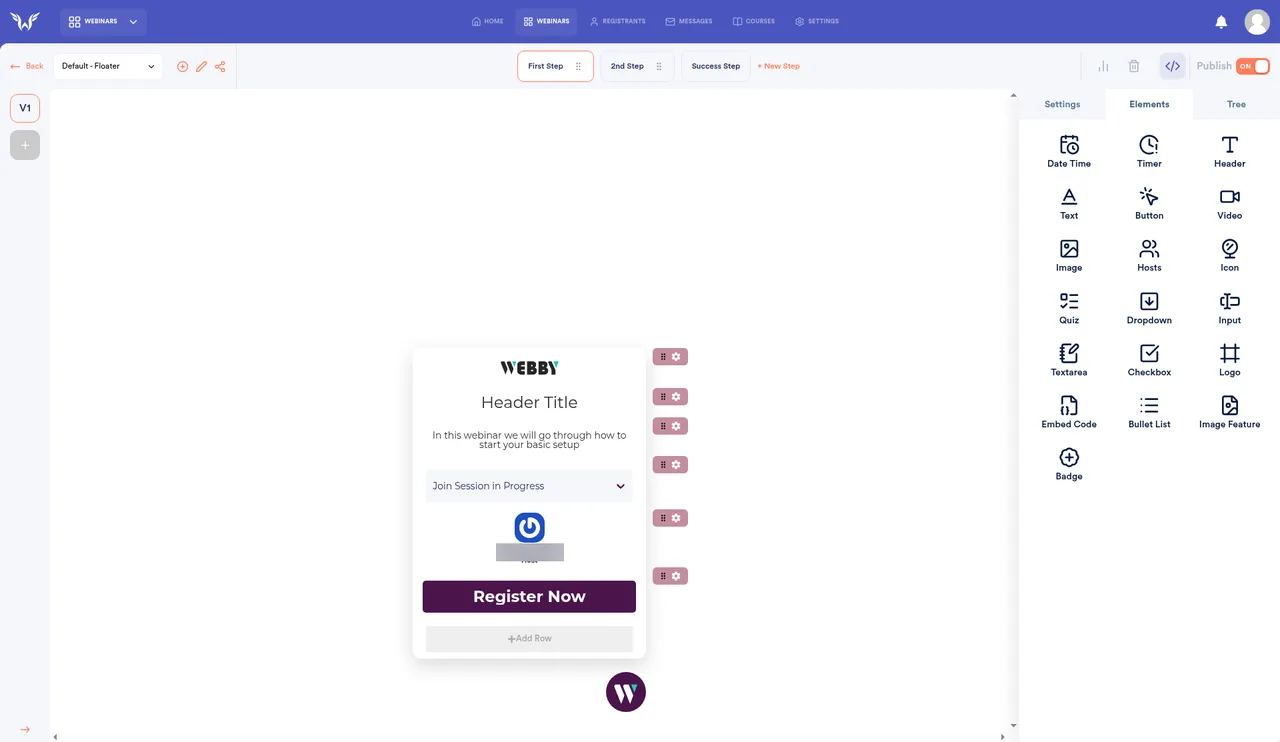
- Registration widgets that adapt to each visitor's time zone (we didn't publish a widget, so we haven't seen this from a visitor's side). Verified Oct 30, 2026: the default form asks only for email and full name plus a consent checkbox (no phone field), and the embed code is script tags rather than an iframe. Verified Oct 27, 2026 in a test webinar: the webinar's Time Zone setting offers "Registrants Time Zone" as its first option, and the widget builder has five templates (Default - Floater, Default - Modal, Default - Embed, Vertical - Thank you, Horizontal - Thank you), multi-step forms (First Step, 2nd Step, Success Step, + New Step) and drag-in elements such as Date Time, Timer, Quiz, Input and Embed Code.
- Split testing of pages, delivery methods and offers. Verified Oct 27, 2026: the registration widget builder has a version selector (V1 and +) for A/B-style versions of a widget. Verified Oct 30, 2026: the only other explicit split test in the trial UI is Webby App Settings > Desktop Live "Split Test" (browser vs app playback). We found no offer or video split-test controls in the trial, even though the vendor site advertises them.
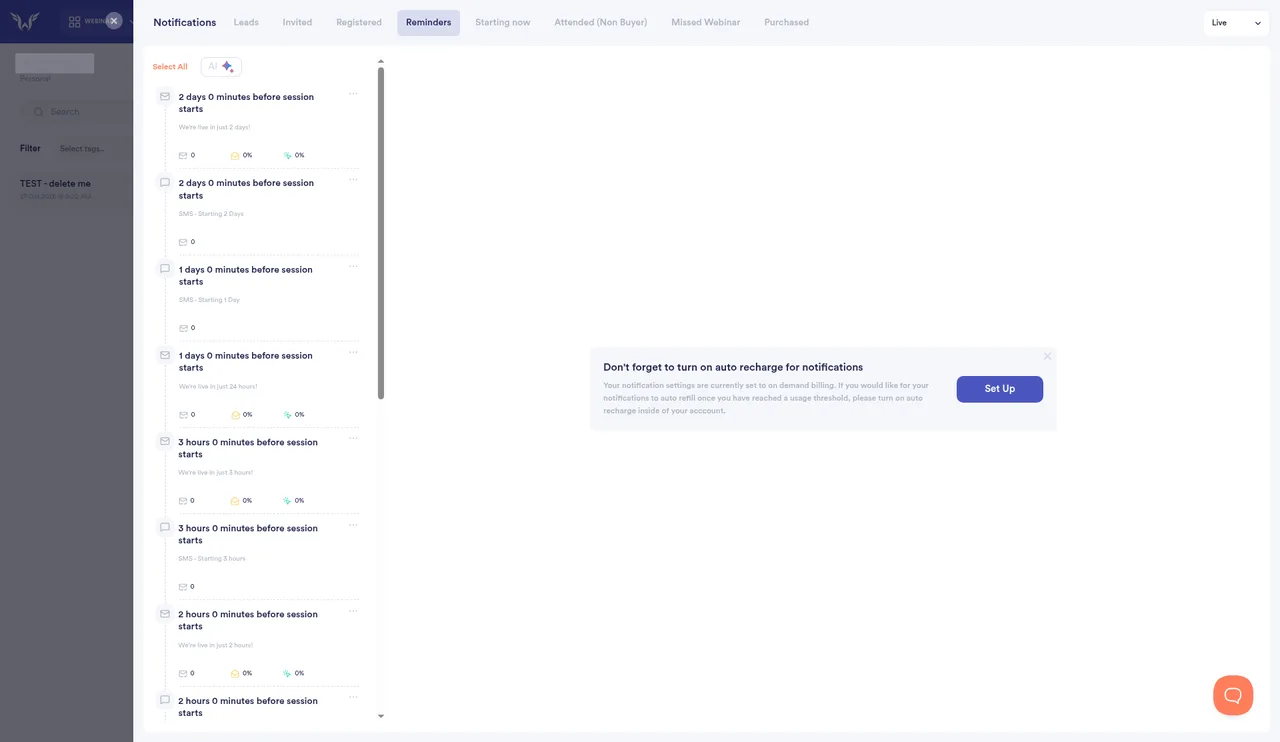
- Email and SMS reminders and segmentation; "AI" predictive reminders (announced July 2026). Verified Oct 27, 2026: a new webinar comes with ready-made notifications. On registration it sends a push, SMS and email at 0 minutes and a "One more thing.." email at 2 minutes. Reminders go out by email and SMS at 2 days, 1 day, 3 hours, 2 hours, 1 hour, 15 minutes and 5 minutes before, plus an SMS at 1 minute (whose default text says "5 minutes", so edit it). There are separate tabs for Leads, Invited, Registered, Reminders, Starting now, Attended (Non Buyer), Missed Webinar and Purchased, for Live, Replay and Encore sessions. Each tab has an AI button. We didn't test it, and the trial's billing screen shows AI Notifications 0/0, so we make no claim about what the AI features do.
- Notification credits are billed on demand: the Notifications screen shows a banner nudging you to turn on auto recharge (seen Oct 27, 2026).
- "Intelligent Chat Automations", new on the homepage banner. WebinarFuel's own Intelligent Chat Automations page (checked Nov 2, 2026) says it sends an instant in-app message when someone clicks the CTA, then "our AI" continues the conversation toward checkout; it greets attendees by name, announces new buyers in chat, fires keyword triggers (SMS follow-ups, sales-team alerts, tags, webhooks/Zapier), and lists "Live Chat Simulation with Filters" with timed responses. Its FAQ says attendees won't know the chat is automated, which is exactly what we don't recommend (see our ethics guide). In our Oct 30 test we couldn't find any of this in the trial UI (it may be newer than our test or sit on a higher plan): automations are rule-based, and the Messages screen is a log with filters, not a place to schedule messages. Verified Oct 27, 2026: each webinar has an Automations screen with "Add New Rule" plus Quick Actions (Clicked Offer Segment, Thanks You Page Sales, Webinar Full, Skip Thank You Page, Registration Devices, Playback Device, Quizzes, Customize Reg Experience, Skip to a specific start time). The room's Live settings let you enable, disable or make private the Chat and Q&A tabs, and merge live chat into a master chat after each session.
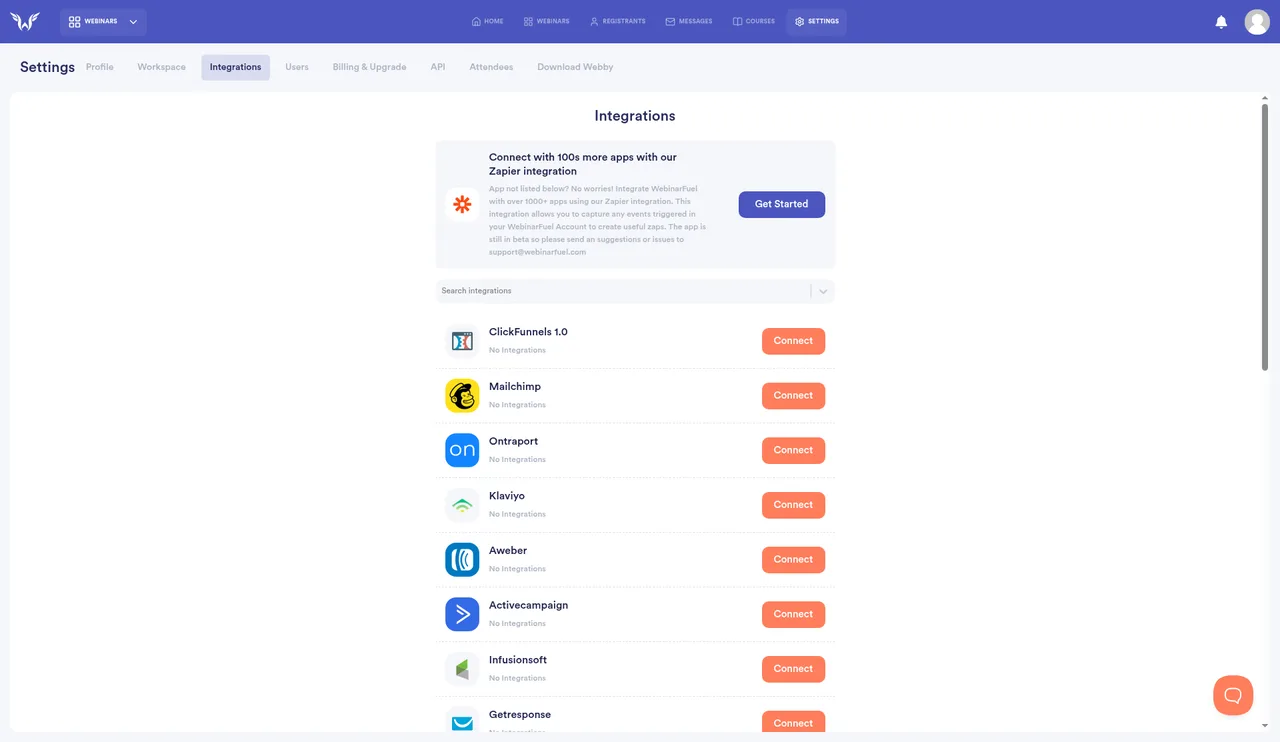
- Integrations (seen in the trial's Integrations screen, Oct 26, 2026): ClickFunnels 1.0, Mailchimp, Ontraport, Klaviyo, AWeber, ActiveCampaign, Infusionsoft, GetResponse, Facebook, Facebook CAPI, Slack, ConvertKit, HTML, Drip, SproutVideo, Wistia, Vimeo, Webhook, Close, Google reCAPTCHA, Cloudflare Turnstile, HighLevel and HubSpot, plus a Zapier app (labelled beta).
- Setup time: in our Oct 30, 2026 stopwatch test, a bare-bones webinar (a 3-second test video uploaded, one Every Day 8:00 PM session, the default widget) took about 2 minutes. A real build with your own recording, copy, reminders and offers takes longer; we didn't time one.
Pros (based on what's documented)
- Built specifically for selling from webinars, with sales prompts and split testing
- Unlimited contacts on Pro
- A 14-day free trial, so you can test before paying
- Its challenge tool (ChallengeFuel, FuelSuite Pro) packages multi-day automated challenges with Facebook-group streaming and VIP gating. Other webinar tools (e.g. WebinarKit) also advertise challenge or multi-day event funnels on their public pages, so treat ChallengeFuel as a FuelSuite bundle feature rather than a one-of-a-kind category.
Cons
- $197/mo is expensive. EverWebinar's annual plan works out to $99/mo, and Demio starts at $45/mo paid yearly.
- Strict refund policy: no refunds on renewals.
- Only 50 SMS credits on Pro; heavy SMS users will need more (the FuelSuite Pro trial itself shows 250 emails and 25 SMS, with "Buy More" and "Auto Recharge" options; overage price not shown in our trial without clicking Buy More)
- The founder's older make-money-online courses have attracted public complaints (BBB, Trustpilot) about upselling. That's a separate business from this software, but worth knowing.
- Making a recording look "live" can mislead attendees. Be upfront with your audience.
- Integrated video only accepts Vimeo Pro links. In our Oct 27, 2026 test, YouTube and plain .mp4 links were rejected, so you have to upload the file to WebinarFuel or pay for Vimeo Pro.
- Reminder emails and SMS use metered credits that are billed on demand, and the app nudges you to turn on auto recharge, so heavy reminder schedules can add to the monthly cost.
Who should buy it
Coaches and course creators who already sell from live webinars and want to automate. Skip it if you have no offer or no traffic yet.
Verdict
WebinarFuel for most course creators; EverWebinar if you're already on the Genesis/WebinarJam stack. This recommendation reflects our WebinarFuel trial and public information about EverWebinar, not a hands-on EverWebinar comparison.
Bonus if you buy through this link
If you buy WebinarFuel through my affiliate link, you also get the Evergreen Webinar Starter Kit: a webinar script template, a 5-email reminder sequence, and a 30-minute setup call. I'll send it after your purchase shows as a referral. It costs nothing extra and doesn't change WebinarFuel's price.
Affiliate link: we may earn a commission at no extra cost to you. Disclosure